
Why is my best-selling product not my most profitable?
Revenue and profit rank products differently. The item that sells most often carries the most discount, the most returns and the heaviest shipping — and Shopify sorts by revenue.
Short answer: because revenue and profit rank products in a different order, and almost every report you have sorts by revenue. Your top seller is usually the one you discount most, ship most, and get returned most — three costs that scale with volume and never appear next to the sales figure.
Here is how the order flips, and how to see your own.
The two lists are not the same list
Export your products sorted by revenue. That is the list Shopify shows you, and it is the list most stores run on.
Now work out, for each of the top ten, what one order actually contributes after landed product cost, what the carrier charged you, payment processing and your settled refund rate.
Re-sort by that.
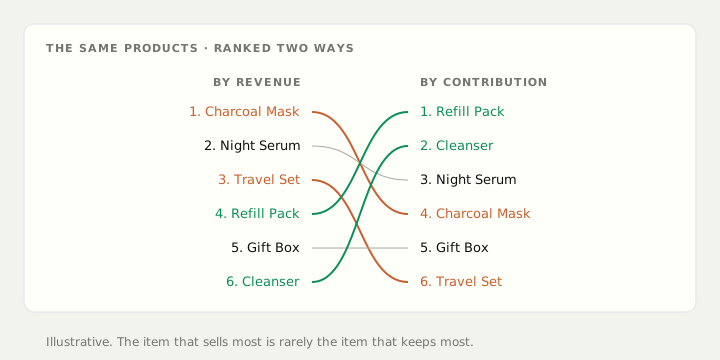
The order changes. Sometimes dramatically. Your top seller by revenue routinely lands mid-table on contribution, and something quiet further down turns out to be carrying the store.
Why the top seller is usually the worst offender
Four things load onto a high-volume product specifically.
It is the one you discount. Best sellers are what goes in the sale, what carries the promo code, what anchors the bundle. A 20% code on a product contributing 40% takes half your margin, and the discount lands on the item that sells most.
It is the one that gets returned. Return rate scales with volume, and often more than proportionally — a popular item reaches more marginal buyers, people less sure they wanted it. Those refunds arrive weeks later and are almost never charged back to the product that caused them.
It is the one that sets your shipping cost. If your best seller is heavy, bulky or fragile, it is quietly setting your average parcel cost while the delivery you charge stays flat.
It is the one your ads point at. Cost to acquire a customer is a real cost of that product, and it lands on whatever the campaign was selling.
None of those four appear anywhere near the revenue number.
The specific trap: high revenue, thin contribution
A product can be your number one by revenue and still be close to break-even, and that combination is worse than an outright loser — because volume disguises it. The revenue line looks healthy, the units move, and the shortfall is spread thinly across hundreds of orders instead of showing up as an obvious hole.
The tell is simple: your revenue grew and your bank balance did not.
What changes once you know
The decisions that point back at the profit list rather than the revenue list:
- What you feature on the home page and in email
- What you discount, and by how much
- What you build a bundle around
- What you point ad budget at
- What you reorder more of, and what you let run down
Most stores are promoting from the revenue list, because that is the one Shopify puts in front of them.
Do it on your own numbers
You do not need software for the first pass. Take your top ten by revenue, and for each work out contribution per order:
- What one unit sells for, after your typical discount on that item
- Minus landed cost — supplier invoice plus freight, duty and clearance
- Minus what the carrier actually charged you to ship it
- Minus payment processing at your real blended rate
- Minus that product's own return rate applied to the value
Multiply each by units sold. Sort.
Then look at what moved. The products that fall are the ones you have been growing at your own expense. The ones that climb are where the next ad dollar should go.
A few people find their number one is negative. That is a rough afternoon and the most valuable thing they learn all year.
If you want the full method for one order first: How do I work out my real profit per order on Shopify?
On Growth and above, Aplon puts gross profit and margin beside every product's sales, after discounts, refunds and the product costs you enter, so a best seller with a thin margin shows itself. See your real product list.
Free, no account
See what your own storefront shows a shopper and Google.
Store Scan reads your public pages and tells you what is missing. Titles, descriptions, headings, image alt text and page weight. Nothing to install.
Scan my storeAplon turns your Shopify store into profit analytics. See how it works.