
Why does Shopify say I made more than my bank did?
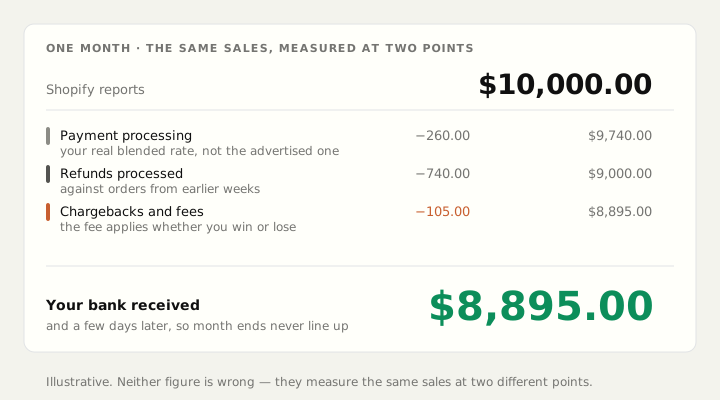
Shopify reports what customers were charged. Your bank receives what is left after fees, refunds and chargebacks, days later. Here is every step of the gap.
Short answer: Shopify reports what customers were charged. Your bank receives what survives fees, refunds, chargebacks and a payout delay. Those are two different numbers measuring two different things, and neither is wrong.
Here is every step of the gap, in the order it happens.
1. Payment processing fees come out first
Shopify's sales figure is the amount customers agreed to pay. Your processor takes its cut before anything reaches you.
For most stores that lands somewhere near 2% plus a fixed amount per transaction, but your real blended rate is higher than the advertised one. International cards cost more. Currency conversion costs more. Wallets and some local payment methods have their own rates.
Check it properly: open your processor's statement for last month, take the total fees, and divide by the revenue that went through it. That percentage is your real rate. It is usually higher than the number you have in your head.
2. Refunds come off, but on a different day
A refund reduces your bank deposit on the day it is processed. In Shopify's reporting it may sit against the original order, in the original month.
So a strong month followed by a wave of returns shows up as a great Shopify month and a disappointing bank month, with the two never lining up. Most stores see the gap between an order and its refund run around two to three weeks.
3. Chargebacks and disputes are deducted separately
A disputed charge takes the order value back out of your balance, and the fee for handling it comes out too, whether or not you win. These arrive weeks after the sale and appear nowhere in a sales report.
4. Payouts are delayed, so you are comparing different periods
Card money does not arrive instantly. There is a settlement delay of a few days, sometimes longer for a new store or a higher-risk category.
That alone breaks any month-to-month comparison. The last few days of your Shopify month land in next month's bank account, and the last few days of the previous month land in this one. Compare a calendar month of sales to a calendar month of deposits and they will never agree, even if nothing else were happening.
5. Some money never goes through your processor at all
Cash on delivery, bank transfer, buy-now-pay-later providers and marketplace orders each settle on their own schedule through their own rails. Shopify shows the sale. A completely different company sends the money, later, minus its own fee.
6. And then the costs Shopify never sees
Everything above is about the same sale being measured at two points. But the number you actually care about — what you keep — has further to fall:
- What the product cost you, landed: the supplier invoice plus freight, duty and clearance
- What the carrier charged you to ship it, which is rarely what the customer paid you
- Picking, packing and materials
- Advertising
Shopify has no idea what you spend on ads. For most stores that is the single biggest deduction of all, and it is completely absent from the number on the home screen.
So which one is right?
Both, for different questions.
- Shopify's sales figure answers: how much did customers agree to buy?
- Your bank deposits answer: how much money physically arrived, in this window?
- Neither answers: how much did I keep? That needs sales, minus refunds, minus landed product cost, minus real shipping cost, minus processing fees, minus advertising.
That third number is the one every decision depends on, and it is the one nothing shows you by default.
How to reconcile it in ten minutes
Do this once and the anxiety usually goes away.
- Take one week that is fully settled — three or four weeks ago, not last week.
- Write down Shopify's total sales for those exact dates.
- Subtract refunds processed against those orders.
- Subtract processing fees, from the statement rather than an estimate.
- Subtract chargebacks and their fees.
- Compare what is left to what actually landed in your bank for that period, allowing for the payout delay.
If it reconciles to within a rounding error, nothing is wrong — you were comparing two different measurements. If there is a real gap left, the usual culprits are a payment method settling somewhere else, or a subscription or marketplace channel you forgot was running.
What to do next
Work out your real per-order profit once, properly. It takes about twenty minutes and it changes what you do with your ad budget, your discounts and your free-shipping threshold.
We wrote the whole method out step by step: The 20-Minute Shopify Profit Audit.
Aplon does this subtraction continuously — landed costs, real carrier charges, processing fees, refunds and ad spend — so the number you look at is what you actually kept. See how it works.
Free, no account
See what your own storefront shows a shopper and Google.
Store Scan reads your public pages and tells you what is missing. Titles, descriptions, headings, image alt text and page weight. Nothing to install.
Scan my storeAplon turns your Shopify store into profit analytics. See how it works.